Today’s step
Instead of “will he text” — one thing to do today from your birth chart, not from a sun-sign horoscope. Four answers in the evening; a week later you see what changed. Free, every day.
Lavender · birth chart, palm and tarot
He went quiet. He came back. He texts every day but never makes plans. Nobody knows what he feels — and Lavender won’t pretend to. What she can do: count how well your birth dates fit, tell you one thing to do today, and help you stop overthinking.
Try the astronomical calculation without signing in. Connecting via Google unlocks live AI guidance and your journal; your first eligible reading is free, while further AI messages may require Petals.
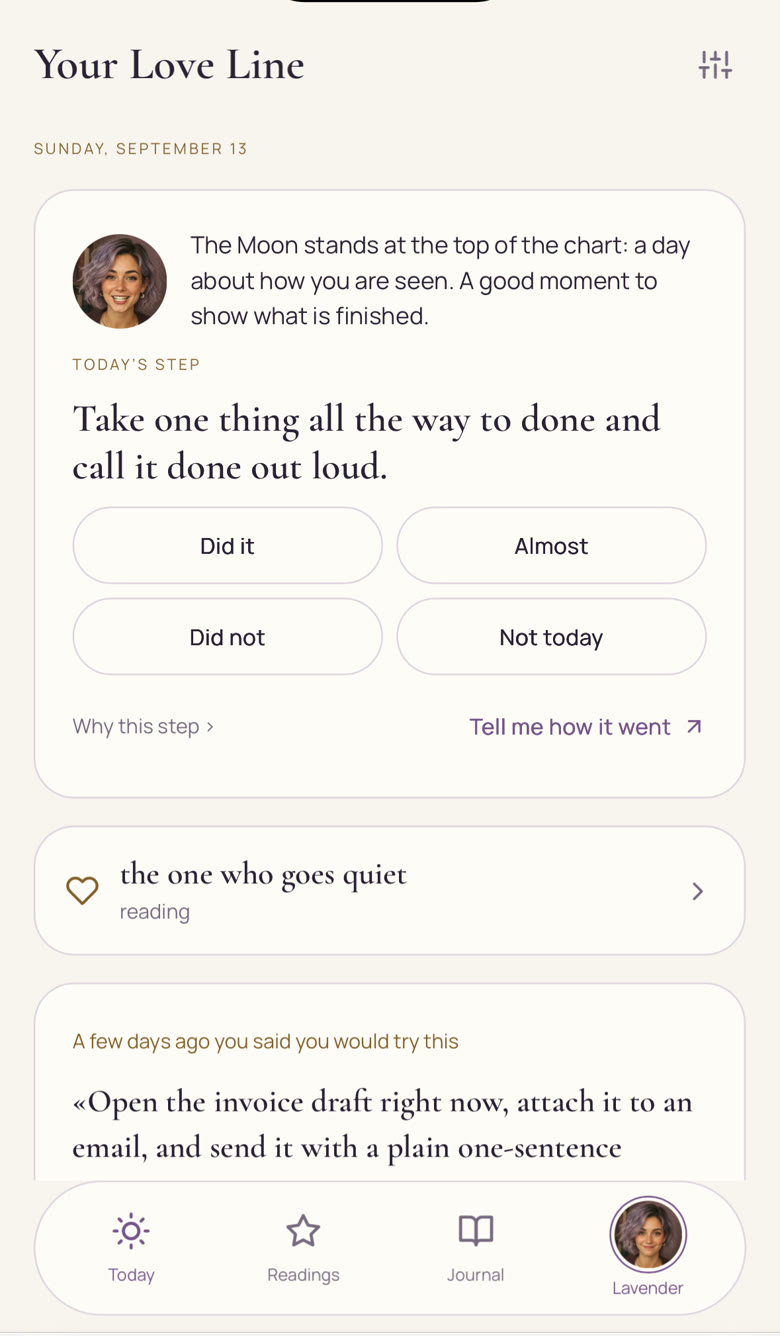

One step from your own birth chart
“Did it?” — and she remembers
How it works
Mixed signals. The message you keep rereading. You don’t have to turn it into the right question — just say what brought you here.
There is someone. I want to look at myself. I just want to talk. One tap, and Lavender knows where to start.
You can skip his: we count from your side. Know it, and you see right away how well you fit: say, 27 out of 36. First reading free.
Not about him — about you: text him, ask straight, don’t text, rest. From your own birth chart, for this day.
Did it · almost · did not · not today. Lavender remembers, and a week later shows you what changed.
What’s inside
The first time is free. After that — Petals, the in-app currency: one-off packs, no subscription.
Instead of “will he text” — one thing to do today from your birth chart, not from a sun-sign horoscope. Four answers in the evening; a week later you see what changed. Free, every day.
Name him in your own words: “the one who goes quiet”, “the one who came back”. No name — Lavender keeps none. From then on she knows who you mean: in the step, in the reading, in the chat.
Eight matches, up to 36 points — the way Vedic astrology counts it. You see the number right away, before the reading. Without his birth time — an honest range, not a round figure.
Learn more →One photo in daylight: the heart line, the fate line and what is actually there. First reading free. The photo isn’t kept — the text is.
Learn more →From your date, hour and city — your own, not a sun-sign horoscope. Love, work, money, children, purpose, and what is going on right now.
Learn more →One tarot card a day — about your step today, not one spread for everyone. Free.
Tell her what you wouldn’t tell a friend. Three replies a day, free. She remembers what keeps coming back — in your words.
Readings, cards and steps stay with you. Sign in with Google and they follow you to any phone.
On your phone
No App Store, no Google Play: it opens from a link, and on your home screen it lives like a regular app — its own icon, notifications included.
Safari only — that’s how iPhone works. Once it’s installed you don’t need the browser.
and tap Share — the square with an arrow at the bottom.
in the list below the app icons. Tap “Add”.
⚙ → “Your account” → “Yes, tell me”. At most twice a week, only when there is a reason.
Chrome offers it by itself as soon as you open your first reading.
and open your first reading.
Tap “Yes”. Or ⋮ → “Install app”.
⚙ → “Your account” → “Yes, tell me”. A notification never says what is inside.
The home-screen app has its own storage. If you already have readings in Safari, sign in with Google first — then your journal comes with you.
What we don’t keep
Not published, not sold, not shown to friends. And four things we don’t have, by design.
Privacy & cookiesOnly your words about him and, if you know it, his birth date.
Needed for the minute of the reading. The journal keeps the text.
If what you write shows you are not okay, nothing from it is remembered.
Someone else may see your screen. What is inside never appears there.
A hello from Lavender · 12 seconds
Who Lavender is
“He texts every day, but never makes plans.” “I want to reach out, but I always reach out first.” “He vanished for a month and came back like nothing happened.” Bring the part that’s hard to explain. Lavender helps you separate what happened from what you’ve filled in.
Before asking what he feels, ask what you need.
She won’t tell you what he feels — nobody knows that. She helps you see what you need and find your own next step.
No. No card knows what another person feels — and we won’t make it up. Lavender counts how well you fit by your birth dates and helps you decide what you do. Asking him straight, by the way, is often the step.
The first pair reading, the palm reading, the card of the day and three replies a day are free. After that — Petals: one-off packs, no subscription.
No. She is powered by AI. She can be wrong; the decisions are always yours.
No. Open the link and everything works in your browser, on your phone or computer. Want an icon on your screen? Three taps — see above.
That’s how iPhone works: only Safari can put a site on the home screen. After that you don’t need the browser.
Only you see your readings. We don’t publish them and we don’t sell them. Details are in the privacy policy.
You don’t need all the answers to begin
Try the astronomical calculation without signing in. Connecting via Google unlocks live AI guidance and your journal; your first eligible reading is free, while further AI messages may require Petals.